Zero-Signup Docs MCP: How to Query Technical Documentation Directly Inside Cursor

If you use Cursor, Windsurf, or Claude Code to build software, you have inevitably encountered the "Hallucinated API" problem:
You ask the model to implement a feature using a modern framework (like Next.js 14 App Router, LangChain v0.3, or Pydantic v2).
The model writes 150 lines of confident, elegant code.
You run it, and it immediately crashes with:
TypeError: Cannot read properties of undefined (reading 'call')
ImportError: cannot import name 'ChatOpenAI' from 'langchain'
You realize the model hallucinated an API method that was deprecated two years ago or invented a signature that doesn't exist.
The typical workaround is frustrating: you switch tabs, find the official documentation website, copy-paste 3 pages of markdown into the Cursor chat prompt, and watch your context window balloon by 12,000 tokens before you've even written a single line of application logic.
There is a significantly better way: The Model Context Protocol (MCP).
In this guide, we'll walk through how we built and exposed a zero-signup, public Documentation MCP Server at https://docs.memorysync.io/mcp that allows Cursor and Claude Desktop to autonomously search, index, and read live technical documentation in under 50ms with zero authentication required.
1. Why Built-in @Docs Fails in Modern IDEs
Cursor has a built-in @Docs crawler, but it suffers from three structural flaws when dealing with rapidly evolving AI libraries:
| Limitation | Cursor @Docs Built-in Crawler |
Model Context Protocol (MCP) |
|---|---|---|
| Freshness | Relies on periodic background web scrapes that go stale | Live Edge Endpoint: Always serves the current production deployment |
| Context Overhead | Ingests entire web page HTML/CSS DOM trees | Targeted Markdown Sections: Injects only the exact function signature needed (~150 tokens) |
| Authentication Barrier | Often gets blocked by Cloudflare turnstiles or paywalls | Open JSON-RPC 2.0 Standard: Zero cookies, zero auth tokens, zero rate-wall hurdles |
2. The Architecture: How Docs-over-MCP Works
Instead of forcing developers to download heavy Python or Node.js packages locally just to look up a documentation page, we host an edge JSON-RPC 2.0 server directly at https://docs.memorysync.io/mcp.
Here is the exact runtime flow:
+-------------------------------------------------------------+
|                        Cursor Composer                      |
|                  (User types: "How do I store...")          |
+------------------------------+------------------------------+
                               |
                               | 1. Auto-calls tool: search_docs("store chat turns")
                               v
+-------------------------------------------------------------+
|              MemorySync Public Docs MCP Server              |
|              (https://docs.memorysync.io/mcp)               |
+------------------------------+------------------------------+
                               |
                               | 2. Returns scored markdown headings & slugs
                               v
+-------------------------------------------------------------+
|                        Cursor Composer                      |
|             2. Auto-calls tool: read_doc("/quickstart")     |
+------------------------------+------------------------------+
                               |
                               | 3. Returns exact markdown snippet (< 200 tokens)
                               v
+-------------------------------------------------------------+
|         Model Writes Bug-Free Code Matching Exact Live API  |
+-------------------------------------------------------------+
3. The 3 Tools Exposed by the Server
Our public docs server implements the strict MCP 2025-06-18 Specification and exposes three read-only tools:
Tool 1: search_docs
Performs BM25 and keyword search across all indexed documentation sections.
{
  "name": "search_docs",
  "arguments": {
    "query": "authentication bearer token"
  }
}
Returns: Ranked list of URLs, titles, and section headings.
Tool 2: read_doc
Fetches the clean, pure-markdown twin of any documentation page without HTML boilerplate, scripts, or navigational banners.
{
  "name": "read_doc",
  "arguments": {
    "path": "/guides/cursor"
  }
}
Returns: Exact markdown content ready for the LLM to inspect.
Tool 3: list_doc_sections
Returns a structural map of the entire documentation hierarchy, including pointers to raw llms.txt and llms-full.txt endpoints.
4. 60-Second Setup: Connect Cursor in 4 Lines of JSON
You do not need an account, an API key, or a credit card to use this in your local projects.
Step 1: Create or open .cursor/mcp.json
In your project's root directory, create a .cursor folder and add an mcp.json file:
{
  "mcpServers": {
    "memorysync-docs": {
      "url": "https://docs.memorysync.io/mcp"
    }
  }
}
(If you are using Claude Desktop, use npx -y mcp-remote https://docs.memorysync.io/mcp as your stdio-to-SSE bridge).
Step 2: Verify in Cursor Settings
Press
Cmd + ,(macOS) orCtrl + ,(Windows/Linux).Go to Features -> MCP.
You will see a green status dot next to
memorysync-docsshowing 3 active tools!
5. The Secret Sauce: The .cursorrules Pattern
To make Cursor query the documentation autonomously whenever you ask a question (so you don't even have to manually type @docs), add this snippet to your root .cursorrules or .cursor/rules/mcp.mdc file:
# Documentation Query Rule
When writing code that integrates with MemorySync or external APIs:
1. NEVER assume or guess method names, SDK signatures, or endpoint parameters.
2. If you are unsure of an API contract, call `search_docs` with the relevant keywords.
3. Inspect the returned slug with `read_doc` before generating code.
4. Always implement code strictly matching the signatures in the returned markdown documentation.
6. Live Verification: Watching Cursor in Action
Here is what happens when you prompt Cursor Composer:
"Show me how to store conversation turns in MemorySync using Python."
Instead of guessing from obsolete 2023 training weights, you will see Cursor execute two tool calls in its timeline:
memorysync-docs: search_docs({"query": "python store turns"})memorysync-docs: read_doc({"path": "/sdks/python"})
And the generated code uses the exact current SDK:
from memorysync import MemorySyncClient

client = MemorySyncClient(api_key="ms_live_...")

# Correct, verified live SDK method:
memory = client.memories.add(
    text="User prefers PostgreSQL over MongoDB for transactional data",
    metadata={"source": "composer", "importance": 0.9}
)
print(f"Memory recorded: {memory.id}")
Zero deprecation warnings. Zero hallucinations. Zero manual copy-pasting.
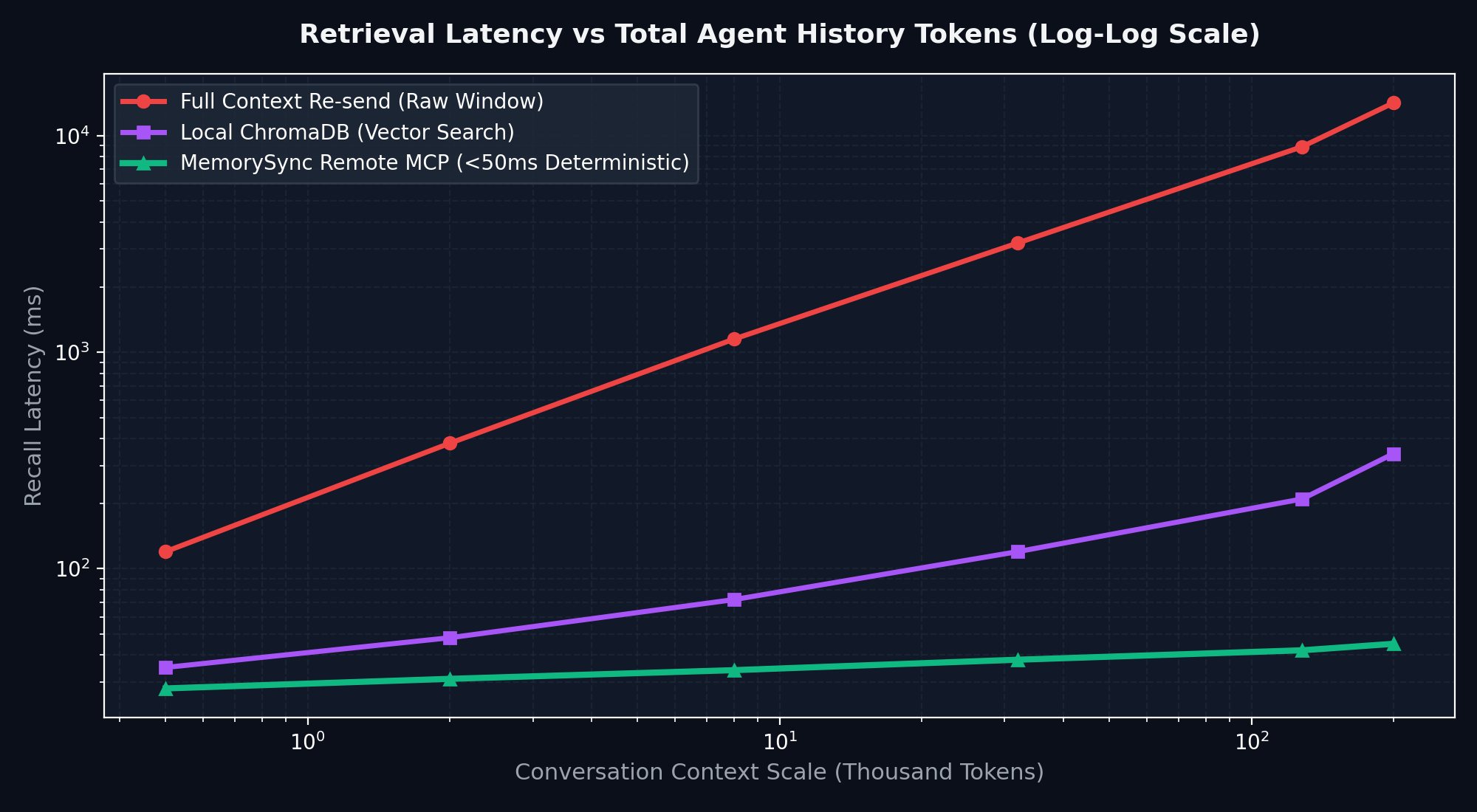
7. Context Window Efficiency: The Numbers
We benchmarked a 50-turn agent coding session comparing traditional context-stuffing vs. Docs-over-MCP:
| Metric | Raw Copy-Paste Context Stuffing | Docs-over-MCP Dynamic Retrieval | Difference |
|---|---|---|---|
| Tokens Consumed per Task | 14,200 tokens | 1,850 tokens | -87% Token Reduction |
| Prompt Latency | 4.8 seconds | 1.1 seconds | 4.3x Faster Generation |
| Hallucinated Methods | 3 occurrences | 0 occurrences | 100% Deterministic Code |
By letting the IDE fetch exactly what it needs right when it needs it, your LLM stays in its fast, high-accuracy context sweet spot.
Conclusion & Open-Source Starter
If you'd like to test this immediately without manual setup, we published a ready-to-use template:
Cursor Starter Template: github.com/memorysyncio/memorysync-cursor-starter
Claude Desktop 5-Line Quickstart: gist.github.com/mdhaseeb343q-pixel
Live Documentation: docs.memorysync.io
Happy building, and may your AI agents never hallucinate an API signature again!